How to Pay in China: A Complete Guide to WeChat Pay, Alipay & Cashless Travel
Master mobile payments in China as a foreign traveler. Step-by-step guide to setting up WeChat Pay and Alipay with international cards, using Tour Card, e-CNY, and avoiding common pitfalls.
How to Pay in China: A Complete Guide to WeChat Pay, Alipay & Going Cashless
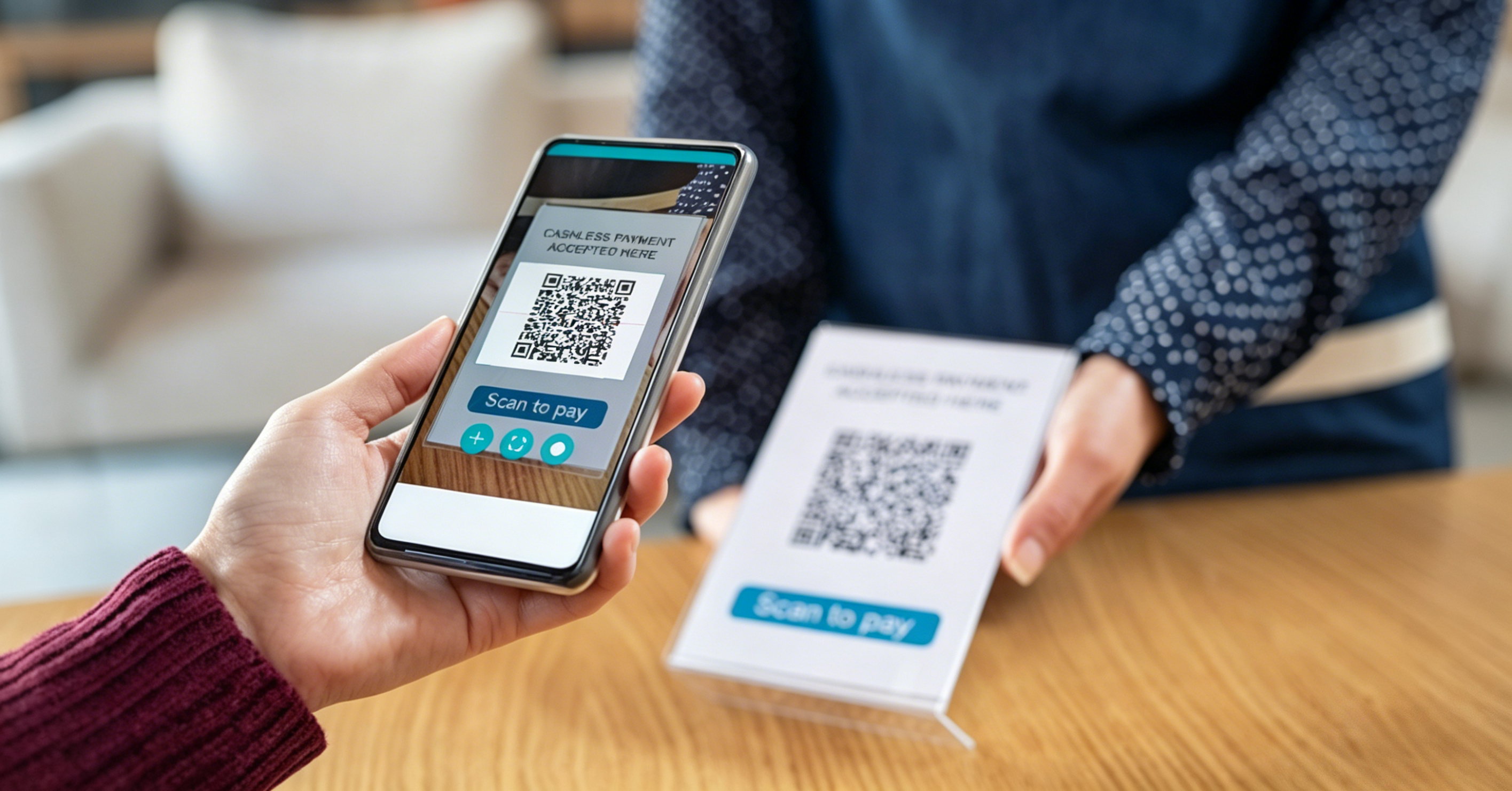
Imagine this: you're at a street food stall in Chengdu, and the vendor gestures at a small laminated card with a QR code. You pull out cash — and she waves it away. She doesn't have change for a ¥50 note. The person behind you in line scans the code, pays ¥8 for a bowl of dan dan noodles, and walks away. The entire transaction took three seconds. You're still holding your wallet.
Welcome to China's cashless economy. But don't panic — this guide is written specifically for foreign travelers who arrive without a Chinese bank account. By the time you finish reading, you'll know exactly how to pay for noodles, taxis, train tickets, temple admission, and yes, even street-corner roasted sweet potatoes — all with your phone.
The Cashless Revolution
China has leapfrogged cash. From luxury malls in Shanghai to vegetable stalls in rural Yunnan, payment happens by scanning a QR code. Over 90% of urban transactions are mobile. The two dominant platforms — WeChat Pay (微信支付) and Alipay (支付宝) — process billions of transactions daily.
For a foreign traveler arriving in 2026, the most important thing to know is this: yes, you can use these platforms without a Chinese bank account. Both WeChat Pay and Alipay now support international credit and debit cards — Visa, Mastercard, JCB, and Diners Club — with passport-based identity verification. It wasn't always this easy. It is now.
Payment Methods at a Glance
| Payment Method | Coverage | Foreigner-Friendly | Notes |
|---|---|---|---|
| Cash (RMB) | Accepted everywhere by law | ★★★★☆ | Always carry ¥200–500 in small bills. Some vendors genuinely have no change. Street markets, elderly vendors, and rural areas still prefer cash |
| International Credit Card (Visa/Mastercard) | Major hotels, high-end restaurants, airports, large shopping malls | ★★☆☆☆ | Do NOT rely on this as your primary payment. Small restaurants, street stalls, taxis, metro ticket machines — virtually none accept foreign cards |
| Alipay (支付宝) | Near-universal — plus built-in translation, taxi booking, train tickets | ★★★★★ | Slightly more foreigner-friendly interface. Set up before departure as your primary payment app |
| WeChat Pay (微信支付) | Near-universal — built into the app everyone already uses for messaging | ★★★★★ | More essential socially because WeChat is China's primary messaging app — your tour guide, hotel, and new friends will all be on it |
| Digital RMB / e-CNY (数字人民币) | Growing acceptance in pilot cities | ★★★☆☆ | Government-issued digital currency. Can be used without internet via NFC. Still rolling out; not yet essential |
Part 1: Alipay Setup & Payment Guide
Alipay (支付宝 / Zhīfùbǎo) is China's leading standalone payment platform. For foreign travelers, its interface is slightly more polished in English, and it includes built-in utilities like taxi booking, train ticket purchasing, and real-time translation — making it the ideal primary payment app.
Alipay: Download & Register
| Step | What to Do |
|---|---|
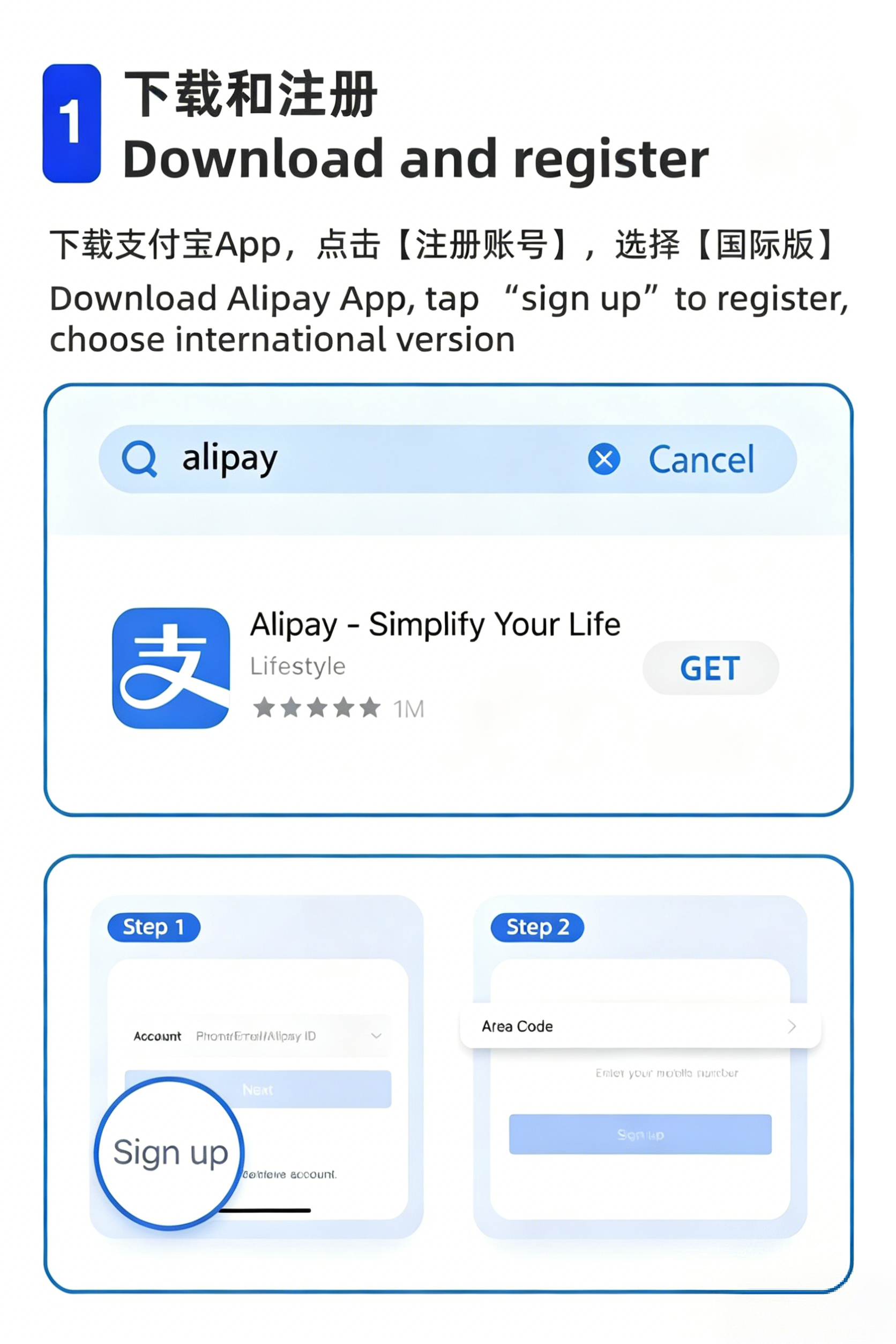
| 1. Download | Go to App Store (iOS) or Google Play (Android). Search "Alipay" — the app icon is a blue square with the white character "支". Make sure the developer is "Alipay (Hangzhou) Technology Co., Ltd." |
| 2. Register | Open the app. Tap "Sign Up" → select your country/region code → enter your foreign mobile number (e.g., +1 for US, +44 for UK). Alipay will send an SMS verification code. Enter the code. |
| 3. Set Language | After registration: tap Me (bottom right) → Settings (gear icon, top right) → Language → select English. The app will restart in English. |
Alipay: Identity Verification (Real-Name Authentication)
This step is mandatory. China's financial regulations require all payment accounts to be linked to a real identity. For foreigners, this means your passport.
| Step | What to Do |
|---|---|
| 1. Navigate | Tap Me → tap your profile/avatar area at the top → Account → Verify Now |
| 2. Upload | Select "Foreign Passport" as your document type. Photograph your passport information page (the page with your photo and details). Ensure all four corners are visible, no glare, and text is sharp |
| 3. Facial recognition | The app will prompt you to look into the camera and perform an action (blink, nod, or turn your head). Follow the on-screen instructions exactly |
| 4. Wait | Verification is usually instant or within a few hours. In rare cases, manual review takes 1–3 business days |
Alipay: Bind Your International Bank Card
Once your identity is verified, link your foreign credit or debit card directly to Alipay. No Chinese bank account required.
| Step | What to Do |
|---|---|
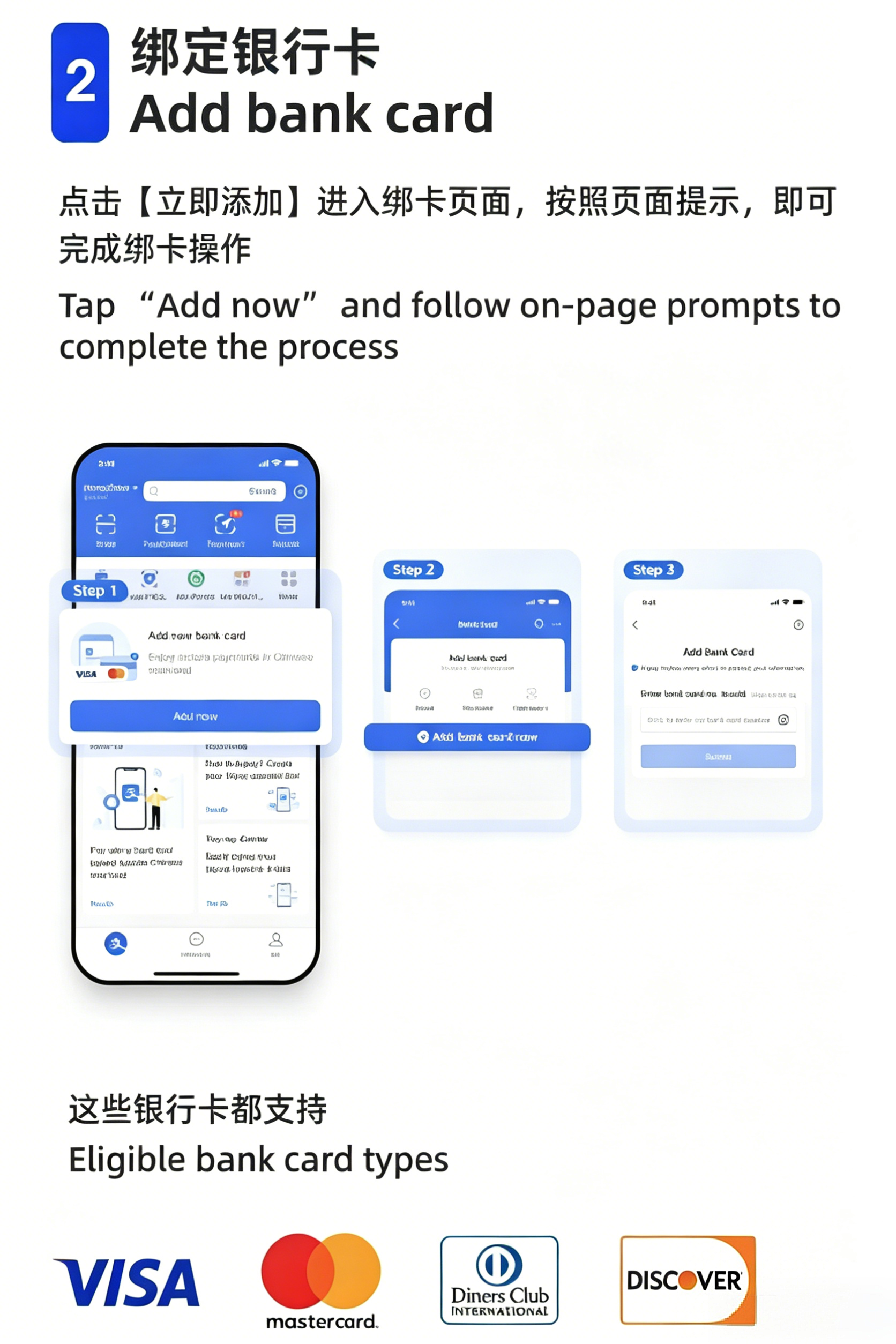
| 1. Navigate | Tap Me → Bank Cards → Add Card (the "+" icon in the top right) |
| 2. Enter card | Type your card number, expiry date, and CVV. Supported networks: Visa, Mastercard, JCB, Diners Club |
| 3. Verify | Your card-issuing bank will send an SMS or app notification to verify. Approve the verification. Alipay may make a micro-charge (¥0.01–1.00) to confirm the card is active, which is immediately refunded |
| 4. Card is live | You'll see your card listed under "My Bank Cards." Your card is now ready for payments |
| Detail | Information |
|---|---|
| Single transaction limit | ~¥5,000–6,500 (varies by card issuer) |
| Annual cumulative limit | ~$50,000 equivalent (per China's foreign exchange regulations) |
| Fees | 3% for transactions above ¥200 on foreign cards. Under ¥200, typically feeless |
Alipay: How to Pay
Alipay supports three payment modes. Here's when to use each:
Mode 1 — Scan the Merchant's Code (扫一扫)
The most common. The merchant displays a QR code (often a laminated card on the counter). You: Tap "Scan" on the Alipay home screen → point camera at the QR code → enter the amount → confirm with password/fingerprint.
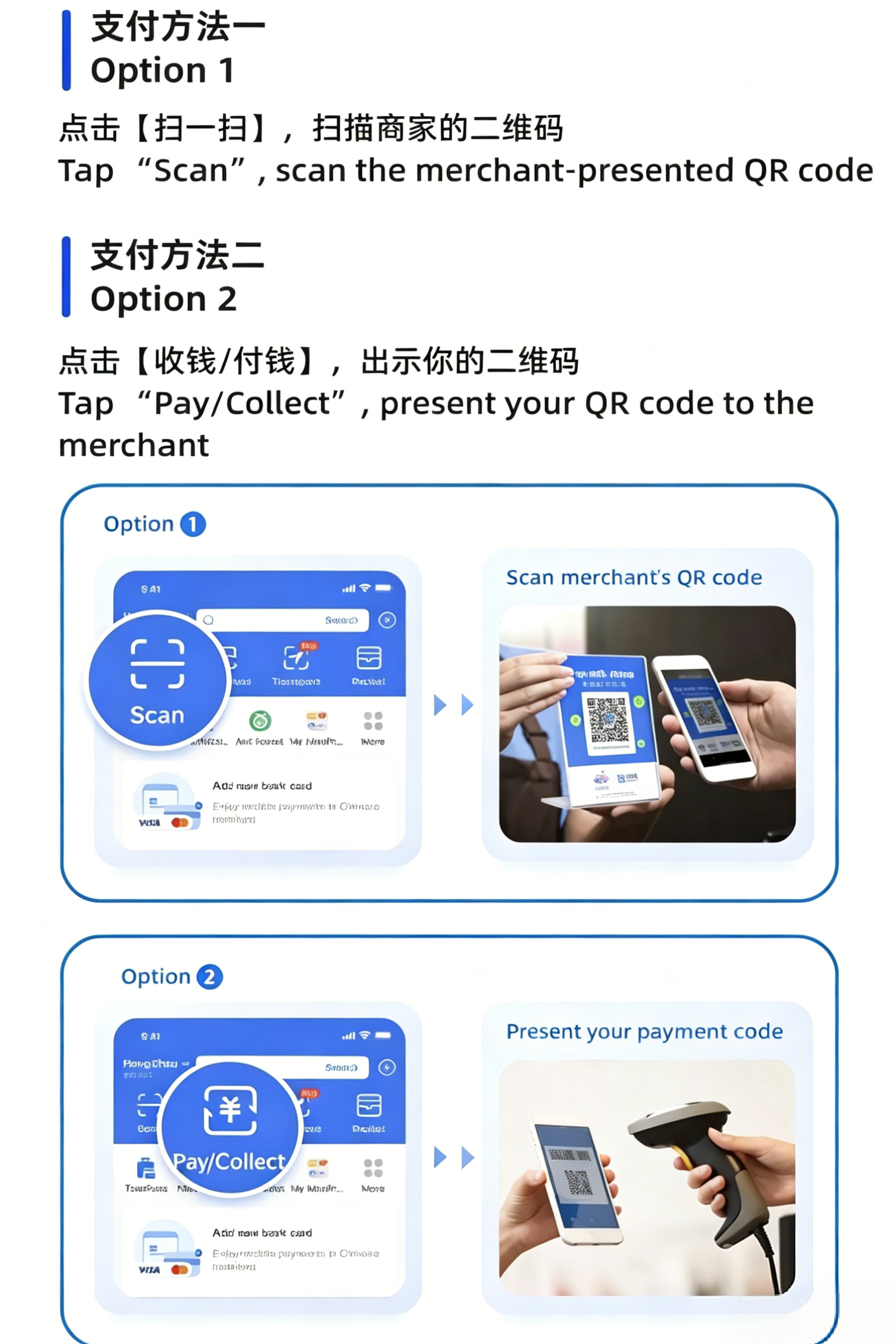
Mode 2 — Let the Merchant Scan You (付钱 / 付款码)
At supermarkets and chain stores. The cashier has a barcode scanner. You: Tap "Pay" on the Alipay home screen → a dynamic QR/barcode appears → the cashier scans it. Amount is deducted automatically. Your code refreshes every 60 seconds — never let someone photograph it.
Mode 3 — Transfer to an Individual (转账)
For paying a guide, a private driver, or splitting a restaurant bill. Tap "Transfer" → enter the recipient's phone number or scan their personal QR code → enter the amount → confirm.
Part 2: WeChat Pay Setup & Payment Guide
WeChat (微信 / Wēixìn) is China's "everything app" — messaging, social media, payments, mini-programs, and news all in one. WeChat Pay is embedded inside WeChat itself. While the setup is slightly more complex than Alipay, the payoff is enormous: every Chinese person you meet uses WeChat, and having it on your phone opens doors that Alipay alone cannot.
WeChat: Download & Register
| Step | What to Do |
|---|---|
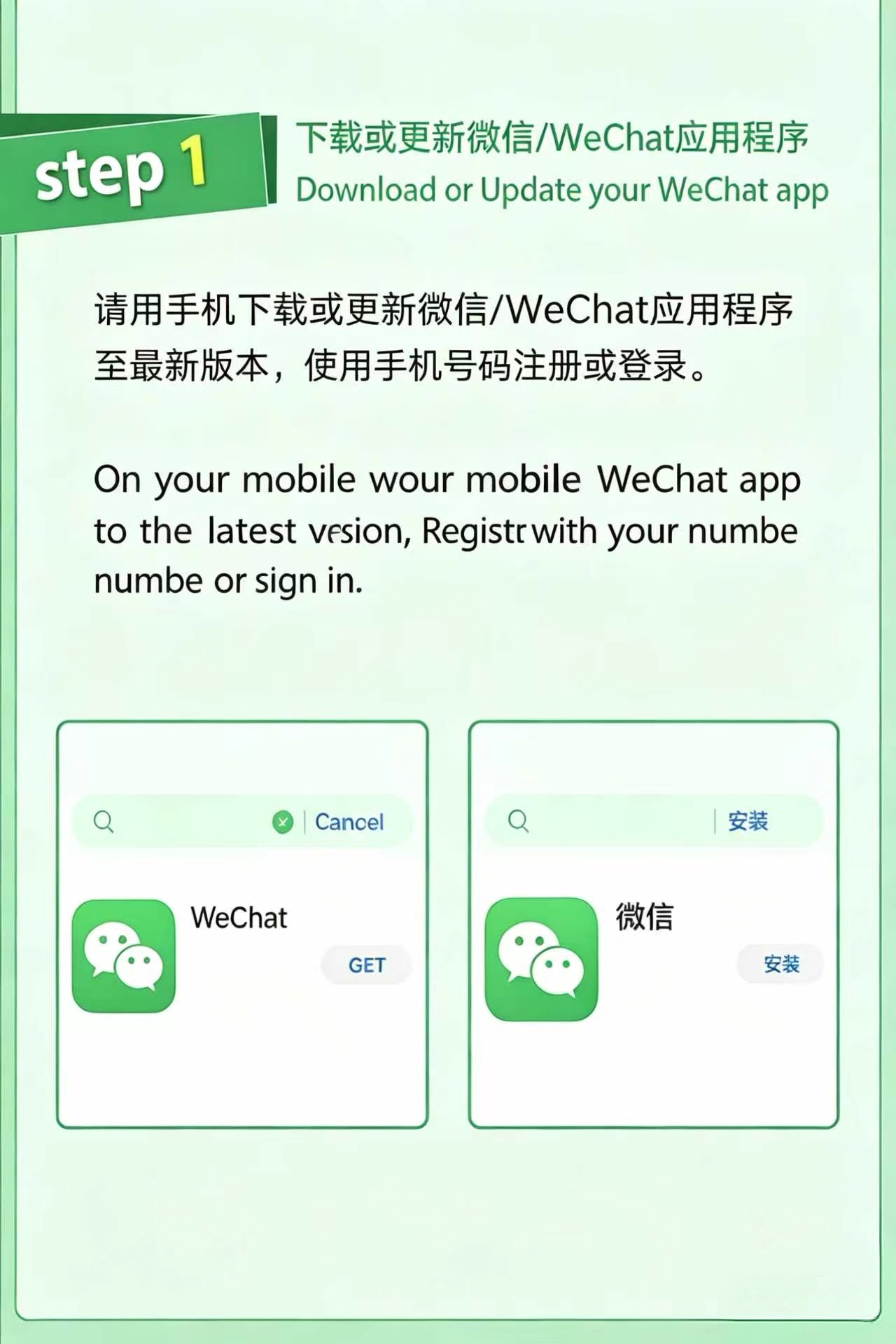
| 1. Download | App Store or Google Play → search "WeChat" — the app icon is green with two white speech bubbles. Developer: "WeChat International." |
| 2. Register | Open WeChat → Sign Up → select your country/region → enter your foreign mobile number. WeChat sends an SMS verification code. Enter the code. |
| 3. Verification | WeChat may require an existing WeChat user to scan a QR code to verify your new account. This anti-spam measure affects some countries' phone numbers. If prompted, ask any WeChat-using friend (your hotel concierge, tour guide, or a Chinese acquaintance) to scan the QR code displayed on your screen. This takes 5 seconds |
| 4. Set Language | After registration: Me → Settings (gear icon) → General → Language → English. The app restarts in English |
WeChat: The Payment Entry
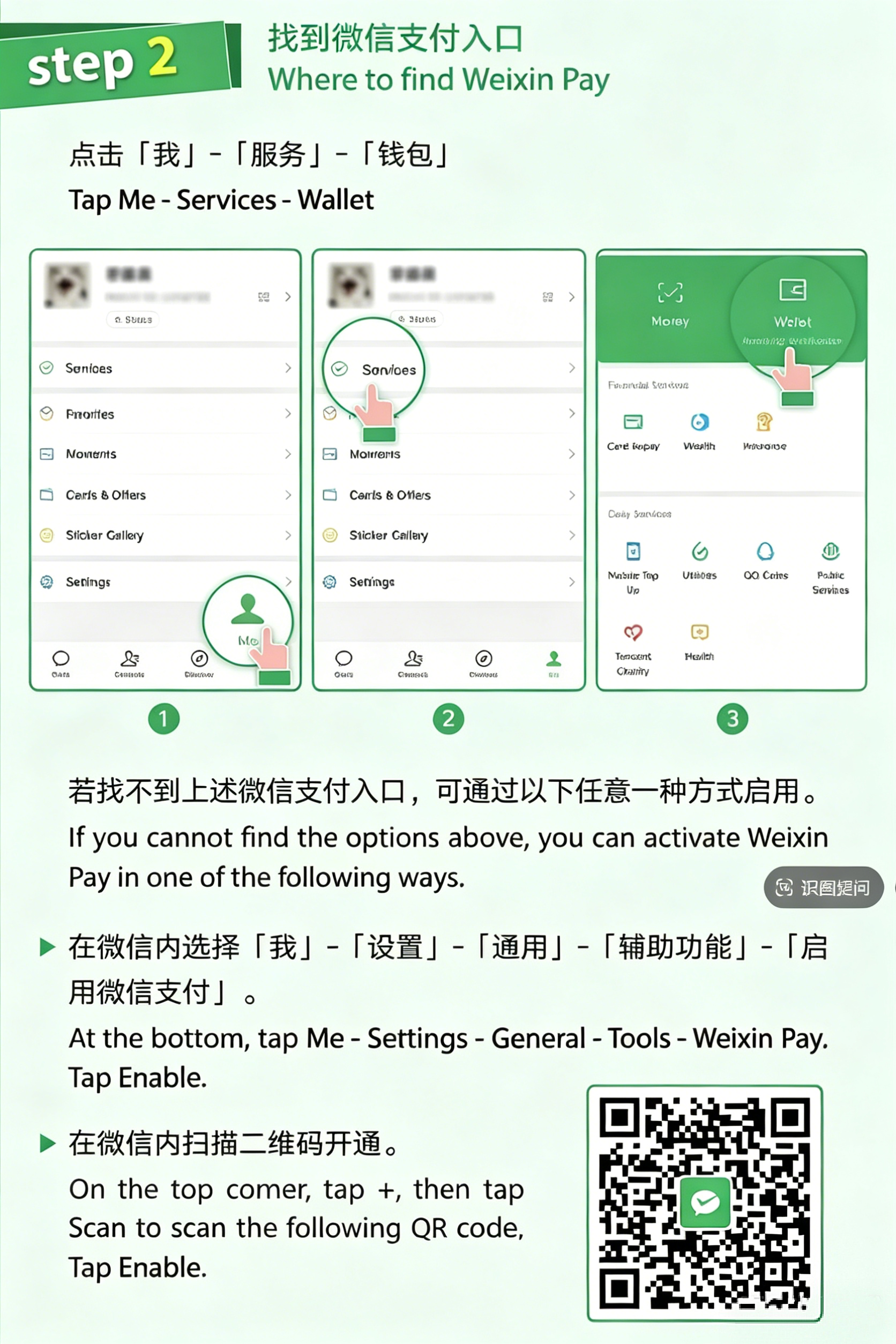
WeChat Pay lives inside the WeChat app. Understanding where to find it is the first step:
| Feature | Where to Find It | What It Does |
|---|---|---|
| WeChat Pay Home | Tap the "+" icon (top right of Chats screen) → "Money" (or "WeChat Pay" in some versions) | Shows your balance and all payment options — Scan, Pay, Transfer, Red Packet |
| Scan (扫一扫) | "+" → "Scan" or the scan icon on the Chats screen | Scan merchant QR codes to pay; also scans friend QR codes to add contacts |
| Pay / Money (收付款) | "+" → "Money" → this is where you toggle between scanning the merchant and showing your payment barcode | |
| Wallet (钱包) | Me → Services (or "Wallet") | Manage your linked cards, check your balance, and view transaction history |
WeChat: Bind Your International Bank Card
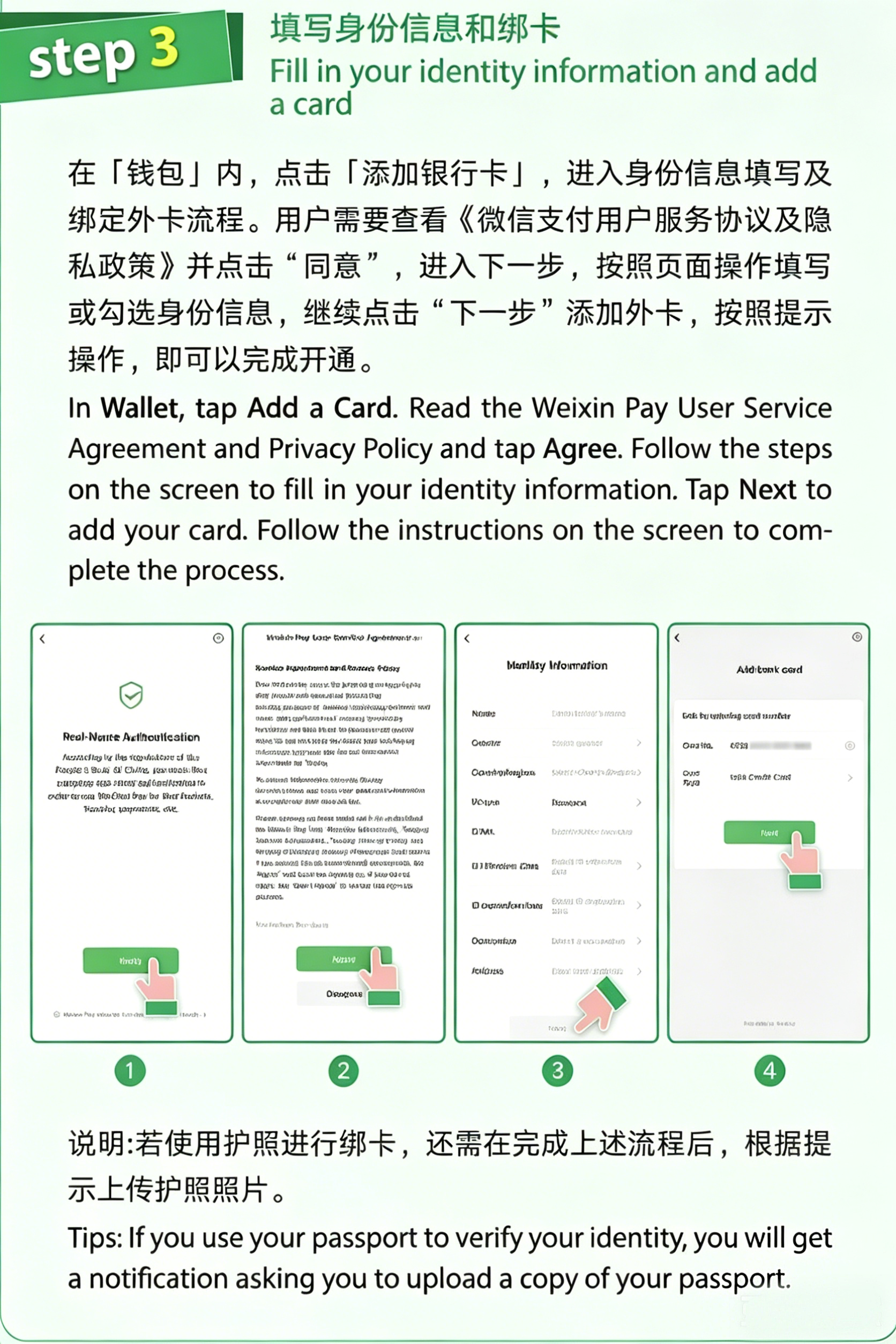
Once registered and verified, link your foreign card to WeChat Pay.
| Step | What to Do |
|---|---|
| 1. Activate WeChat Pay | Me → Services → Wallet. If this is your first time, WeChat will prompt you to set up WeChat Pay. Tap "Add a Card" or "Verify Identity." |
| 2. Identity Verification | WeChat requires passport-based identity verification first. Upload a photo of your passport information page → complete facial recognition (blink or nod as instructed). This is the same regulatory requirement as Alipay |
| 3. Add Card | After verification is approved: Me → Services → Wallet → Cards → Add a Card. Enter your Visa, Mastercard, JCB, or Diners Club details |
| 4. Verify with Bank | Your card issuer sends an SMS or app notification for approval. Confirm. WeChat may make a micro-charge (¥0.01–1.00) that is immediately refunded |
| 5. Set Payment Password | WeChat requires a 6-digit payment PIN. This is NOT your phone unlock code — it's a separate password used exclusively for payments. Choose something memorable but not obvious |
WeChat Pay: Real-World Use Scenarios
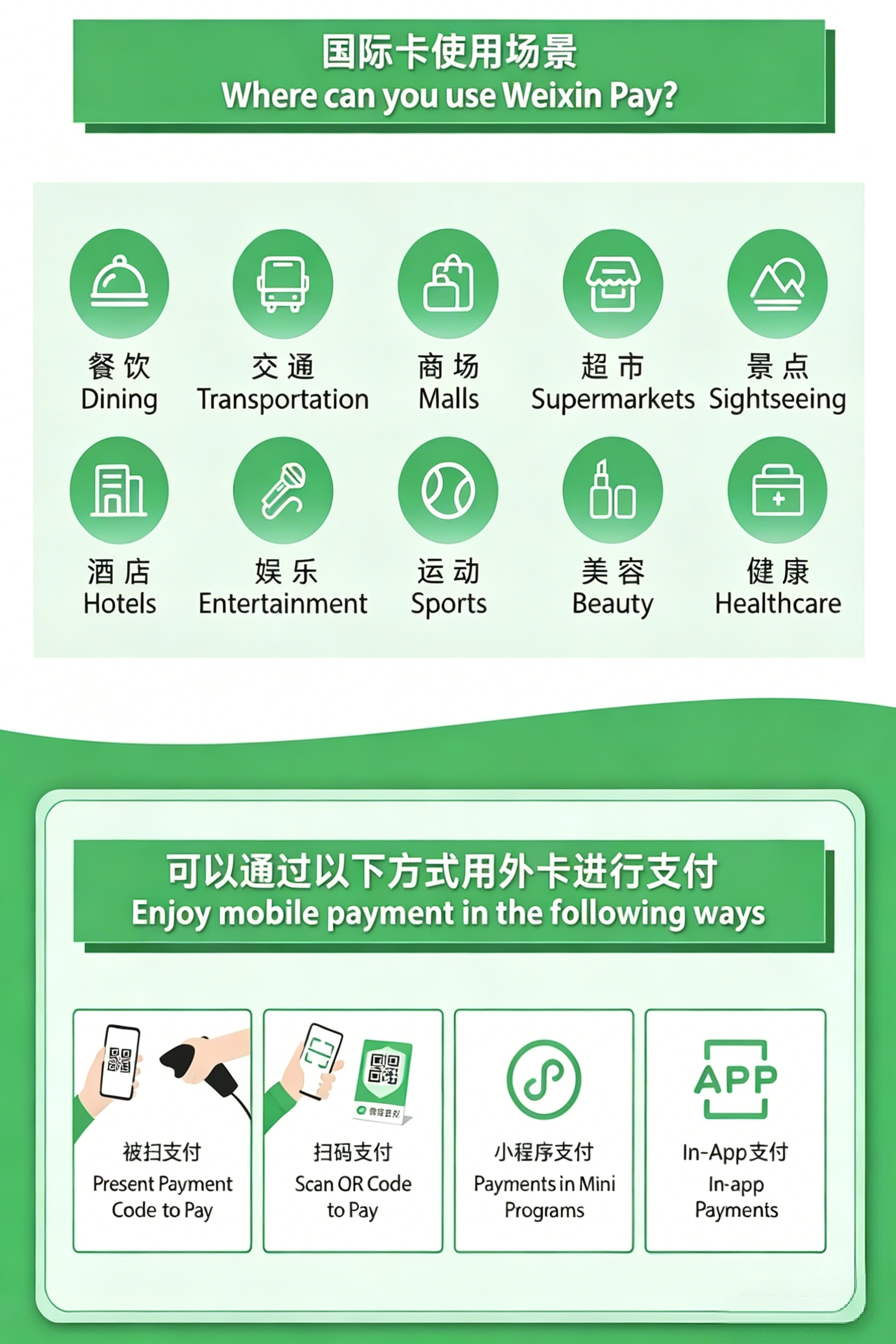
WeChat Pay's strength is that it's embedded in China's social fabric. Here's where you'll use it:
| Scenario | How to Pay |
|---|---|
| Street food stalls & small shops | Scan the merchant's printed QR code (the most common method). Tap "+" → "Scan" → frame the QR → enter amount → confirm with PIN |
| Supermarkets & chain stores | The cashier scans your payment barcode. Tap "+" → "Money" → a dynamic QR/barcode appears on your screen → the cashier scans it. Amount is auto-deducted. Your code refreshes every ~60 seconds |
| Paying a guide or private driver | Tap "+" → "Money" → "Transfer". Enter the recipient's mobile number or WeChat ID. They receive the money instantly |
| Splitting a restaurant bill | Use "Go Dutch" (AA收款 / AA shōukuǎn) — one person pays the total, then sends individual payment requests to everyone else through the group chat. Each person taps the request to pay their share |
| Red Packets (红包) | A festive feature for sending monetary gifts to individuals or groups during Chinese New Year, weddings, or birthdays. Tap "+" → "Money" → "Red Packet" (not available in all interface versions — look for the red envelope icon). Not essential, but fun |
WeChat Pay Frequently Asked Questions
Q: What documents can I use to set up WeChat Pay?
- Passport or People's Republic of China Foreign Permanent Resident ID Card
- Mainland Travel Permit or Residence Permit for Hong Kong SAR, Macau SAR, and Taiwan Residents
Q: Do I need a Chinese Mainland (+86) phone number?
No. You can use your international phone number as long as it can receive SMS verification codes.
Q: What kind of transactions does WeChat Pay currently support for international cards?
Currently, international cards can be used for everyday purchases within the Chinese Mainland. However, international cards do not support certain features such as Red Packets (红包) and money transfers (转账). Please refer to the payment page for specific instructions.
Q: Is there a transaction limit? How is the exchange rate calculated?
| Limit Type | Amount |
|---|---|
| Single transaction | ¥6,000 |
| Monthly cumulative | ¥50,000 |
| Yearly cumulative | ¥60,000 |
The exchange rate is calculated based on the rate of the card organization and the issuing bank of your international card.
Q: Are there any transaction fees?
Yes. However, transaction fees are waived for single transactions under ¥200. A 3% transaction fee will be applied for single transactions above ¥200. If you request a refund, the transaction fee will be reimbursed in proportion to the refunded amount. Please refer to the payment page for details.
WeChat Pay Customer Service
If you have any other questions, please contact:
| Channel | Number | Notes |
|---|---|---|
| Chinese Mainland | 95017 | Chinese-language support |
| Outside Chinese Mainland | +86 571 95017 | International hotline |
Tour Card & Other Alternatives
If you can't get either app working, or if you want additional options:
Tour Card (微信/支付宝内小程序)
Both WeChat and Alipay host a mini-program called "Tour Card" — a reloadable prepaid digital card designed specifically for foreign visitors.
| Feature | Detail |
|---|---|
| How to find it | Open WeChat or Alipay → search "Tour Card" or "Tour Pass" in the app's search bar |
| Loading | Top up with Visa/Mastercard/JCB; minimum ~¥100, maximum ~¥2,000 per load |
| Fees | Typically 0% for loading; small transaction fee in some versions |
| Refunds | Unused balance is refundable (may take 5–10 business days) |
Digital RMB / e-CNY App (数字人民币)
China's central bank digital currency app is available in major app stores and supports foreign mobile numbers for registration. Link an international card to load digital yuan and pay via QR or NFC.
How to Pay in Real Life — Quick Reference
| Pattern | Who Initiates | Where It's Used | How |
|---|---|---|---|
| You scan merchant | You | Street stalls, small shops, restaurants, taxis | Open Alipay/WeChat → Scan → frame QR → enter amount → confirm |
| Merchant scans you | Cashier | Supermarkets, chain stores, some restaurants | Open Alipay/WeChat → Show Payment Code → cashier scans |
| Transfer | You | Private guides, drivers, splitting bills, paying a friend | Open Alipay/WeChat → Transfer → enter phone number → amount |
Dealing with Common Issues
| Problem | Likely Cause | Solution |
|---|---|---|
| Transaction declined | Card issuer blocked it | Call your bank; ask them to whitelist Chinese payment platforms |
| Transaction declined | Exceeded single or annual limit | Try a smaller amount or use a different card |
| "Account restricted" | ID verification incomplete/expired | Re-verify with passport in Wallet settings |
| Can't add card | Unsupported card type or mis-typed | Double-check card details; ensure Visa/MC/JCB/Diners |
| App in Chinese | Language not switched | Settings → Language → English |
| Offline / no signal | VPN conflict or poor coverage | Turn off VPN; offline codes work in some versions |
| Asked for Chinese bank card | Some features require mainland card | Core payment functions (scan, pay, transfer) work fine with foreign cards |
Customer Service Hotlines
If you can't resolve an issue through the app, both platforms offer English-speaking customer support by phone:
| Platform | Hotline | Hours | Best For |
|---|---|---|---|
| Alipay (Overseas) | +86 571 2688 6000 | 24/7 | Account setup issues, card binding problems, transaction disputes, Tour Pass questions |
Safety & Best Practices
| Do ✅ | Don't ❌ |
|---|---|
| Set a strong 6-digit payment PIN | Use birth dates or repeated numbers |
| Enable fingerprint/Face ID | Screenshot your dynamic payment barcode |
| Verify the amount before confirming | Trust strangers who offer to "help set up" your app |
| Keep ¥200–500 cash as backup | Link bank cards that aren't yours |
| Check transactions regularly | Ignore fraud alert SMS from your bank |
You're Ready to Go Cashless
Setting up Alipay and WeChat Pay as a foreigner takes about 30 minutes before your trip — and transforms your China experience. You'll move through markets, restaurants, museums, and train stations with the same speed and ease as locals. No fumbling for change. No awkward "do you take cards?" conversations. Just scan, pay, and go.
Your final checklist: download both apps now, register with your passport, add your card, and make a ¥1 test transaction. When the plane touches down, China's cashless economy is already in your pocket.
- 📋 Check visa requirements
- 💡 Read essential travel tips
- 🍜 Explore Chinese food culture
- 📧 Subscribe for payment updates
Got a China payment story or question?
Did you successfully set up Alipay or WeChat Pay with your foreign card? Did something go wrong? Share your experience in the comments — your tips could save the next traveler an hour of frustration. We read every reply.
Related Articles
Payment in China as a Foreigner – Alipay, WeChat Pay & Cash Guide
Master mobile payments in China. Step-by-step Alipay & WeChat Pay setup for foreigners with foreign cards, Visa/Mastercard usage, cash tips, and city-by-city payment friendliness.
Essential China Travel Tips 2026: Internet, Payment, Transport & Safety
Everything you need to know before traveling to China — VPN setup, mobile payments, high-speed trains, safety tips, packing checklist, and more. A practical guide for first-time visitors.
China Visa Policy & Application Guide (2026)
The complete 2026 guide to China's visa policies — visa-free countries, 144-hour transit, L tourist visa application, fees, and FAQs for international travelers.